

Offering a smooth, professional interview experience is key to engaging top talent. By connecting your video conferencing platform to your ATS calendar, you can schedule virtual interviews in just a few clicks—no juggling links or switching between tools.
Once connected, platforms like Google Meet, Zoom, or Microsoft Teams can automatically generate meeting links when you schedule interviews, making life easier for both your hiring team and your candidates.
Below are the steps to connect your video conferencing tool.
Before You Begin
Your calendar must already be connected to the ATS before the video conferencing integration will appear.
If your calendar is not connected yet, please see the article: Calendar Feature: How to Schedule and Add Interview Locations
Step 1: Navigate to Your ATS Calendar
Log in to your ATS.
Click View Calendar in the navigation menu.
Suggested Screenshot:
Calendar page showing the View Calendar link or button in the navigation.
Step 2: Open Manage Connections
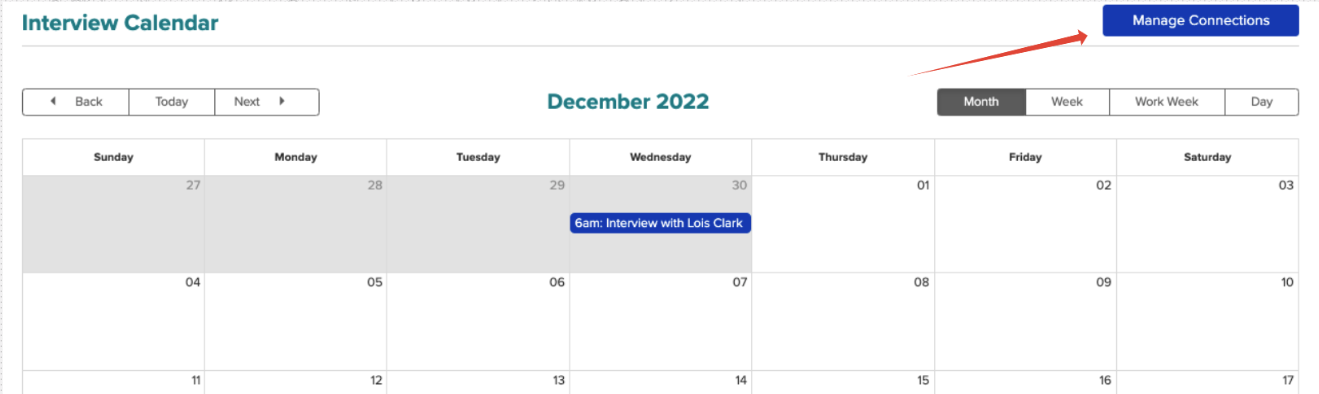
From the calendar view, locate the Manage Connections button.
Click Manage Connections to open the integrations page.
Step 3: Scroll to the Video Conferencing Section
On the Manage Connections page, scroll to the bottom of the screen.
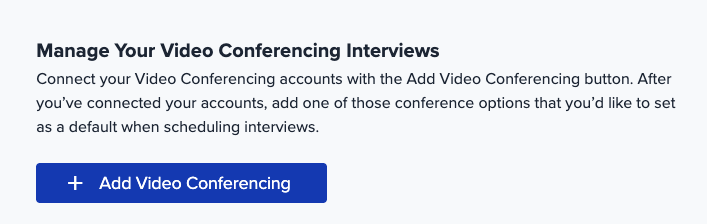
Look for the Video Conferencing section.
Note: If you do not see this section, confirm that your calendar integration is already connected, as this feature only appears after that step is completed.
Step 4: Add a Video Conferencing Provider
- Click + Add Video Conferencing.
- A new window or prompt will open to begin the connection process.
Step 5: Authorize Your Video Conferencing Tool
Select your preferred provider (such as Zoom, Microsoft Teams, or Google).
Follow the on-screen prompts to sign in.
Grant the required permissions so the ATS can create meeting links through Cronofy.
Once authorization is complete, your video conferencing tool will be connected.

Note: If you want to add additional Video Conferencing products, please repeat the steps above.
What Happens Next?
After connecting your provider, it will automatically appear as an option when scheduling interviews in the ATS calendar. When selected, the system will generate a meeting link and include it in the interview invitation—making virtual interviews simple and organized.
If you run into any issues or have questions about setting up integrations, our support team is always happy to help. Don’t hesitate to reach out—we’re here to make your hiring process as smooth as possible.